How to Use Dianping in English: Foreigner's Guide (2026)
Dianping now has an English setting: Mine > Settings > Language. Learn login, search, booking, vouchers and how to read Chinese reviews as a visitor.
Updated 10 min readCSK Team
On this page20 sections
- What Dianping is
- Download the app
- Switch the app to English
- Create an account
- Search and find food
- Read reviews without Chinese
- Book a table or take a queue number
- Vouchers and deals
- Paying
- Avoid tourist traps
- Allergies and dietary needs
- Offline and data
- Read a restaurant page
- Use rankings and lists
- Queue tickets (取号)
- Use the WeChat and Alipay mini programs
- Read a menu with photos
- Common situations and what to do
- A simple routine for your trip
- FAQ
Quick answer: Dianping (大众点评) is China's main restaurant review, booking and voucher app, owned by Meituan. The app now has an official English setting: Mine (我的) > Settings (设置) > Language (语言). Menus and buttons switch to English, but restaurant names and most reviews stay Chinese. You can pay in-app with Alipay or WeChat Pay.
What Dianping is
Dianping is a Yelp and OpenTable hybrid. It lists restaurants and other local businesses, with ratings, photo reviews, menus, price per person, table booking, queue numbers and vouchers. It is owned by Meituan, which also runs the delivery app (see Meituan vs Dianping).
| Feature | Dianping | Google Maps / Yelp / TripAdvisor |
|---|---|---|
| Works in mainland China | Yes | Google services are blocked |
| Photo reviews from locals | Very common | Fewer for China |
| Table booking and queue numbers | Yes, in the app | Rarely |
| Vouchers and group deals | Yes | No |
| English interface | Yes, in Settings | Yes |
| English reviews | No, reviews are Chinese | Some |
Download the app
- iPhone: Search "Dianping: Discover Good Places" or "大众点评" in the App Store. The listing declares English, Japanese, Korean and Chinese. Region issues are covered in Dianping on iPhone.
- Android: Use Google Play before you arrive, or the official site or your phone maker's app store once in China. Avoid random APK sites.
- No app: The mobile website at dianping.com works for browsing, but booking and vouchers are much easier in the app.
Download before you land. Do it on home Wi-Fi so you do not depend on roaming data.
Switch the app to English
- Open Dianping and tap 我的 (Mine), bottom right.
- Tap the settings gear or menu, then 设置 (Settings).
- Tap 语言 (Language) and pick English.
Menus, tabs and buttons change. Restaurant names, dish names and user reviews do not. Some reviews have a translate button. For the full walkthrough and fixes, see how to change Dianping to English.
Create an account
Dianping supports foreign phone numbers at login. Success varies by country and carrier.
- Tap 我的, then 登录/注册 (Log in / Register).
- Choose your country code and enter your number without extra prefixes.
- Enter the SMS code. Wait a full minute before asking for another.
- Choose a nickname. English is fine.
If the SMS never arrives, try WeChat login (微信登录) if you have WeChat set up, or see Dianping without a Chinese phone number.
Search and find food
- Open the 美食 (Food) tab, or search a dish in English. Common words like "dumpling" or "hotpot" often work, but Chinese works better. Copy the dish name from a menu photo if you have one.
- Use 附近 (Nearby) to see ranked places around you.
- Filter by price per person (人均), distance, cuisine and rating.
Useful Chinese terms
| Chinese | Pinyin | Meaning |
|---|---|---|
| 美食 | měishí | Food |
| 火锅 | huǒguō | Hot pot |
| 烧烤 | shāokǎo | BBQ |
| 川菜 | chuāncài | Sichuan food |
| 粤菜 | yuècài | Cantonese food |
| 西餐 | xīcān | Western food |
| 人均 | rénjūn | Average spend per person |
| 只看有图 | zhǐ kàn yǒu tú | Show only reviews with photos |
Read reviews without Chinese
- Rating is out of 5. Many popular places sit between 4.0 and 4.8, so compare review count too.
- Sub-scores: 口味 (taste), 环境 (atmosphere), 服务 (service).
- Filter to reviews with photos and sort by newest. Recent photos show what you will actually get.
- Use your phone's built-in translation (iOS Translate, Android Circle to Search) on review text.
| Word in a review | Meaning |
|---|---|
| 好吃 / 食材新鲜 | Tasty / fresh ingredients |
| 性价比高 | Good value |
| 贵 | Expensive |
| 踩雷 / 坑 | Disappointing / a rip-off |
| 排队久 / 等位久 | Long wait |
| 服务差 | Poor service |
Ratings and review volume can be gamed by any platform. Treat a high score with only a handful of reviews with caution.
Book a table or take a queue number
Popular places offer a booking button (订座 or 预订) or an online queue (取号 or 排队). The steps are in Dianping reservation guide. In short: pick the date, time and party size, leave a phone number, and show the confirmation at the door. Not every restaurant takes bookings through the app. Some only allow same-day queue numbers.
Vouchers and deals
Many restaurants sell vouchers (代金券) and set meals (套餐) in the app. A voucher is usually slightly cheaper than the face value, and a set meal can be cheaper than ordering the same dishes à la carte. Discounts vary by shop, so read the terms (使用规则) for time limits, which dishes are excluded, and whether you need to book ahead. Buy only what you will use soon and check the expiry date.
At the restaurant, show the voucher QR code before you order.
Paying
Dianping offers Alipay and WeChat Pay at checkout where the merchant supports it. Foreign cards work through both wallets, with no platform fee for payments of ¥200 or less and a 3% fee above that, per the usual published terms. Limits vary by card and verification level. Set up payments first with Alipay setup or WeChat Pay for foreigners. Use the CNY converter to check prices at about ¥6.7 to US$1.
Avoid tourist traps
- Check that the menu price in the app matches the menu you get. Take a screenshot.
- Be wary of a very high rating with few reviews, or many generic reviews posted in the same week.
- If a waiter pushes a "house special" not on the app menu, ask the price first.
- Restaurants next to major attractions are often overpriced. Walk a few blocks and use Nearby.
Allergies and dietary needs
The booking note field is free text. Write your restriction in Chinese. The free Chinese allergy card gives you ready-made wording. Staff cannot always confirm ingredients in sauces, so show the card again at the table.
Offline and data
Save a few restaurants and screenshot their address and phone number. Copy the address and paste it into your taxi or map app. See how to use DiDi and China SIM card options for data.
Read a restaurant page
Once you open a listing, the page is laid out the same way for most restaurants.
| Part of the page | What to look at |
|---|---|
| Header | Name (Chinese), overall rating, review count, price per person (人均), cuisine tag |
| Photos and 推荐菜 (recommended dishes) | The dishes diners order most, with photos |
| 菜单 (menu) | Dish list with prices, where the restaurant has uploaded one |
| 团购 / 代金券 | Vouchers and set meals |
| 订座 / 取号 | Booking or queue button, if offered |
| 评价 | Reviews, filterable by photo, newest, or rating |
| 商家信息 | Address, phone, opening hours, map link |
Do three checks before you commit: price per person fits your budget, recent reviews with photos look like what you want to eat, and the opening hours (营业时间) cover your visit. Opening hours change around public holidays, so for a trip in the October or Spring Festival weeks, call or check the latest reviews. See the reservation guide for peak-time booking.
Use rankings and lists
Dianping publishes ranked lists, such as popular places in a neighborhood or best-of lists by cuisine. They are a fast shortcut when you cannot read reviews. Treat a list as a starting point, then open two or three entries and read the newest photo reviews. A ranking tells you what locals chose, not what suits your taste or dietary needs.
Search tips when you cannot type Chinese:
- Search the English name of well-known chains and international dishes first.
- Search a district or landmark name, then filter by cuisine.
- Copy a dish name from a menu or a sign and paste it into the search bar.
- Tap a cuisine tag on any listing you like to see similar places.
- Use the map view to see what is within a short walk of your hotel.
Queue tickets (取号)
Busy restaurants often run a digital queue. If a listing shows 取号 or 排队, you can take a number from your phone, see how many tables are ahead (前面X桌), and get a notification when it is close. Details differ per restaurant. Some need you to be within a certain distance, and some close the queue at a set time. If your number is called and you are not there, it can lapse, so stay nearby. If the app will not let you take a number, ask at the host stand and show your phone.
Use the WeChat and Alipay mini programs
You do not have to install the app. Search 大众点评 inside WeChat's mini programs, or look for it in Alipay's search. Mini programs reuse your WeChat or Alipay login, which avoids the SMS step, and WeChat has a built-in page translate option. They cover search, reviews and many bookings, with fewer features than the app. Good for a short trip. See WeChat setup for foreigners first if you have not set up WeChat.
Read a menu with photos
Dianping menus usually pair dish photos with prices. Use that to your advantage.
- Open the 菜单 tab or the 推荐菜 section.
- Screenshot the dishes you like, including the Chinese name and price.
- At the table, point at the screenshot, or show it to the server.
- Check the final bill against the screenshot. If a price differs, ask politely and show the screenshot.
Prices on the app may be out of date, so treat them as a guide. For more on ordering and table manners see Chinese restaurant etiquette and Chinese food for beginners.
Common situations and what to do
| Situation | What to do |
|---|---|
| No booking button | Take a queue number if offered, call, or walk in off-peak |
| Voucher not applied | Show the voucher QR code before you order, and ask the server to scan it |
| Voucher says "cannot combine" | Read the terms (使用规则) and ask what applies |
| Price differs from the app | Show your screenshot and ask politely |
| Restaurant has no record of your booking | Show the confirmation screen and call the restaurant |
| You cannot get an SMS code | Use WeChat login or the mini program |
| Language barrier at the table | Use a translation app and the allergy card |
A simple routine for your trip
Before you leave: install the app, switch the language, test login at home, save a few places per city, and set up Alipay or WeChat Pay. Use the pre-departure checklist to cover the rest.
Each day: open Nearby, look at the top results, read photo reviews, then book, take a queue number, or walk in. Save one backup place near your hotel in case the first choice has a long line.
FAQ
Does Dianping have English?
Yes. Open Mine (我的) > Settings (设置) > Language (语言) and choose English. Menus and buttons change. Restaurant names and most reviews remain Chinese.
Can I use Dianping with a foreign phone number?
Foreign numbers are supported at login, but SMS delivery varies by country and carrier. If the code does not arrive, try WeChat login or a different network.
Can I pay for Dianping vouchers with Alipay or WeChat Pay?
Yes, where the merchant supports them. Foreign cards work inside Alipay and WeChat Pay. Fees and limits depend on your card and wallet verification.
What is Dianping?
Dianping is China's biggest restaurant review, table booking and voucher app, owned by Meituan. It is used mostly by locals to choose where to eat.
Is Dianping better than Google Maps in China?
For restaurants, yes. Google services are blocked in mainland China, and Dianping has far more local photo reviews. For navigation, use a map app such as Amap.
Essential Apps for This Guide
All 19 apps →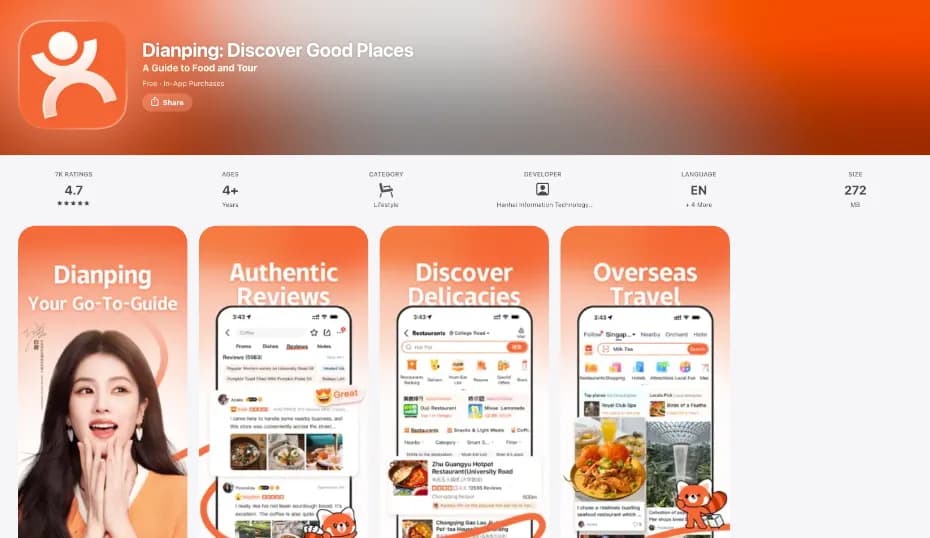
More guides like this
- Food & DrinkHow to Book a Restaurant on Dianping, Step by Step (2026)
- Food & DrinkHow to Change Dianping to English: Settings Guide (2026)
- Food & DrinkDianping on iPhone: Download It From the App Store (2026)
- Food & DrinkDianping Without a Chinese Phone Number: What Works (2026)
- Food & DrinkVegan Travel in China: A Complete Guide (2026)
- Food & DrinkMeituan vs Dianping: Which App Do Foreigners Need? (2026)
Rules and apps in China change often. Guides are checked against official sources — see our editorial & verification standards. Spotted something out of date? Tell us at [email protected]. Published March 18, 2026.